Introduction
Starting a career in cloud engineering brings both excitement and new questions. You learn how programmers combine efforts with computer operators to deliver software quickly. Beginners need a structured learning plan so they do not feel lost. Platforms like DevOpsSchool.org provide clear tracks that organize your daily study time. You focus on fundamental command-line tasks before touching advanced network servers. Next, you explore code version systems and automated test cycles. Later, you practice packaging programs into portable software boxes for the web. This step-by-step method keeps your learning calm and productive. You build real skills each day and watch your confidence grow. Soon, you can launch complete web projects with speed and safety.
What Is a DevOps Roadmap?
A DevOps roadmap gives learners a direct, easy-to-follow path through software operations. Programmers build computer code, and operations teams run that code on real servers. DevOps unites both sides so they collaborate as one helpful unit. Years ago, these workers stayed apart and argued over system crashes. Today, teams share tools and solve problems together with speed. A roadmap points out which core skill you should tackle first. You do not need to learn every shiny new program online. Instead, focus on big concepts that never go out of style. You learn to move fresh code from a laptop to web users smoothly. A clear guide prevents confusion and keeps your daily study fun.
A Simple DevOps Learning Path
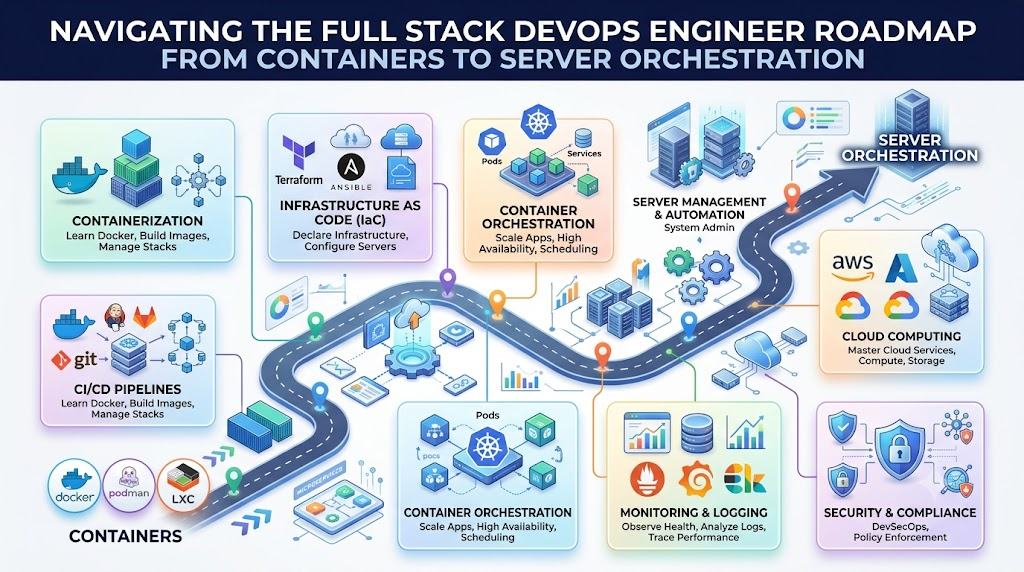
Beginners start with basic computer controls and advance toward modern cloud setups. First, discover Linux because most internet servers run on its open engine. You type simple words into a black terminal window to direct the machine. Next, pick up Git to store your code revisions and track team edits. After that, study computer networks to trace how information travels across the globe. Then, open cloud accounts to run virtual servers on the internet. Wrap your applications inside Docker units so they run anywhere without errors. A container serves as a neat digital box for your files. Next, build automated pipelines that check and publish software updates without manual clicks. Then, master Kubernetes to orchestrate large groups of active containers. Finally, write code to construct complete server fleets with instant safety alarms.
| Learning Stage | Main Skills | Simple Goal |
| Foundation Level | Linux, Git, and Computer Networks | Direct servers with text commands and save code edits safely. |
| Cloud and Boxes | Remote Cloud Services and Docker Units | Run apps inside neat portable boxes on internet machines. |
| Automatic Pipelines | CI/CD Workflows and Shell Scripts | Test and publish code updates without manual typing. |
| Scale and Safety | Kubernetes Clusters and Health Watchers | Run large groups of apps safely with fast system alarms. |
DevOps Engineer Roadmap
Every working engineer relies on a dependable schedule to manage live web apps. You begin each week by writing short scripts to eliminate boring, repetitive tasks. A script sends quick directions to your computer so you save time. Next, connect your Git repository to an automated testing system. When a developer saves new work, your pipeline checks the files for errors. If the tests pass, your system transfers the app to cloud machines. Then, use setup files to build new virtual computers in seconds. You also monitor CPU usage and watch for memory issues. When an app breaks, your alert tools ring your phone right away. Beginners can test this through an easy home project. Write a simple webpage and save your changes with Git. Next, pack the files into a Docker container. Finally, run a short script to launch your site on the web.
DevOps Tools You Should Understand
Modern software squads use specialized programs to keep their internet services fast and secure. Code repositories record every change so developers never misplace important files. Container engines bundle applications with their extra parts so they run anywhere without bugs. Pipeline tools run automatic tests and deliver fresh features directly to online users. Cluster managers direct thousands of containers across big rooms full of servers. Setup tools build complete server networks by reading plain text configuration files. Monitoring boards track server heartbeats and show live speed graphs on screen. Log collectors gather status notes from every running program into one easy view. Cloud platforms let you rent high-power machines in seconds from any country. Security scanners inspect code to spot hidden vulnerabilities before bad actors find them. Sync tools update your live servers to match your Git files automatically.
| Tool Area | Purpose | Example Tools |
| Version Tracking | Saves project changes and prevents accidental file loss. | Git and GitHub |
| App Packaging | Places code into a light, portable digital box. | Docker and Podman |
| Auto Delivery | Tests code quality and releases updates without manual clicks. | Jenkins and GitHub Actions |
| Machine Setup | Creates servers and networks from simple text files. | Terraform and Ansible |
| Health Tracking | Measures server performance and alerts staff during outages. | Prometheus and Grafana |
DevOps Tools Comparison Made Simple
Selecting new software requires a thoughtful review before you download anything. First, identify the exact job you need the tool to do. Check the features to see if the program solves your immediate issue. Look at the learning difficulty, because hard tools slow your team down. Review the software price so you do not exceed your budget. Examine the security controls to keep company records safe from outside eyes. Search for active help communities and clear instructional guides on the web. Test how easily the program connects with the tools you already own. Consider team background so everyone can use the software with comfort. Make sure the software can support millions of new visitors as you expand. The most famous tool does not always fit your needs. Simple open tools often yield the best results for growing teams.
DevOps Certifications Roadmap
Professional credentials can give your career path a strong, helpful push forward. A study plan helps you pick the right exam at the right time. Beginners should practice on real projects for several months before paying exam fees. Choose an introductory test that matches the cloud provider you use most. Read the exam outline carefully and learn all testing requirements. Remember that tests cost money, so study well before you schedule your date. Most badges expire after two or three years, which requires renewal tests later. Set up personal test labs on your laptop to try out every exam topic. Review practice questions to improve your speed and sharpen your focus. Passing a test never replaces the ability to write and run actual code. Hiring managers prefer candidates who solve problems and show working projects. Use tests to show personal discipline, study habits, and dedication.
SRE Roadmap
Site Reliability Engineering shows you how to keep busy websites running without crashes. You can explore this path after you understand everyday DevOps skills. An SRE acts like a skilled doctor for high-traffic websites. You start by learning deep Linux tricks and network routing rules. Next, you build live status dashboards that track system health every single minute. You save clear log files to see what happened before an outage. Then, you set up smart alarm rules so you wake up only for real emergencies. You write clear recovery plans to help your team fix system crashes quickly. Next, you write automated scripts that restart failed services without human help. You balance uptime goals with cool new features to protect user trust. Finally, you plan future server capacity so holiday traffic never slows down your site.
Platform Engineering Roadmap
Platform engineering creates smooth paths for everyday software developers. This specialty builds handy self-service systems that remove technical roadblocks. You make a clear internal portal where developers grab computing tools on their own. In the past, coders waited days for someone to set up server databases. Now, platform engineers build systems that give them fresh servers with one click. You unite cloud accounts, Linux systems, and container clusters behind one clean screen. Next, you set up prebuilt delivery pipelines that coders run with ease. You hide tricky infrastructure rules behind simple buttons and drop-down menus. This setup makes daily software creation fast, pleasant, and productive. For instance, a developer pushes one button, and your platform creates a database instantly. Developers ship code faster because you handle all the difficult background plumbing.
Real-Life Scenarios / Experiences
- Manual Update Pain: A retail team spent four hours copying files by hand to servers every Friday night. They set up an automatic CI/CD pipeline using basic shell scripts and Git triggers. The new system cut release time to ten minutes and stopped human typing errors completely.
- Server Setup Mismatches: An app ran smoothly on a developer laptop but crashed on production machines. The engineer packed the code inside a Docker container with all required software files. The unified package worked the same way across development, testing, and production servers.
- Holiday Traffic Outages: An online store crashed during a holiday sale because server hard drives filled up. The team set up Prometheus to track disk space and send instant chat alerts. The engineers now delete old cache files early and keep the store open smoothly.
- Slow Employee Setup: New hires spent their first two weeks installing software tools on their company laptops. The platform team automated local computer configuration with one setup script. New developers now run tests and ship small code fixes on their very first morning.
Common Mistakes to Avoid When Choosing Delhi Events
- Skipping Linux Foundations: Students often try advanced cloud tools before learning basic terminal commands. You must practice shell commands daily because all cloud platforms rely on them.
- Juggling Too Many Tools: Trying to learn ten programs at once scrambles your concentration. Pick one popular tool in each category and master its main functions first.
- Neglecting Git History: Beginners often modify server files live without tracking changes through version control. Save every edit to a dedicated branch so you can undo mistakes safely.
- Reading Without Typing: Browsing textbooks without typing terminal commands builds zero real muscle memory. Launch free practice labs on your computer and test ideas every single week.
- Hoarding Certifications Without Code: Stacking paper certificates without publishing actual code will disappoint job interviewers. Create a public portfolio of small, running systems to show what you can do.
- Bypassing Network Rules: Skipping IP addresses, subnets, and DNS creates huge headaches during site outages. Spend time studying how data packets travel across the public web.
- Ignoring Cloud Expenses: Leaving test machines running inside cloud accounts creates shocking monthly bills. Delete all practice virtual machines as soon as you finish your daily study lab.
- Exposing Secret Keys: Beginners often commit private passwords and tokens into public code files. Store private keys in safe vaults and keep sensitive data away from public eyes.
How DevOpsSchool.org Fits Into Your Learning Plan
Structured guidance keeps your engineering goals on target throughout the year. DevOpsSchool.org provides open learning resources tailored for students and career switchers. You can adopt their structured 90-day learning plans to guide your daily study hours. The platform offers clear roadmaps for DevOps, SRE, and modern Platform Engineering. You can also browse their technology directory to evaluate software choices side by side. Learners access detailed tool research, hands-on labs, guided tutorials, and an expansive technical glossary. You can review step-by-step certification resources and verify your credentials in their public registry. These materials bridge theoretical concepts with real-world technical duties. You make steady career progress without getting lost along the way.
DevOps Jobs and Career Growth
Learning modern infrastructure skills opens the door to multiple rewarding tech careers. You can begin as a junior DevOps engineer helping teams release safe software updates. If you love fixing broken servers and keeping websites online, choose the SRE path. Cloud engineers spend their days organizing virtual networks, data storage, and compute nodes. Platform engineers build handy self-service consoles that accelerate development work across an entire company. DevSecOps engineers scan pipelines and container layers to protect systems from cyber attacks. You can pursue these roles by building practical projects and writing down your steps. Practice troubleshooting broken setups on your home laptop to sharpen your diagnostic skills. Publish your working code openly so future hiring managers can see your real technical growth.
Frequently Asked Questions
1. Why do teachers recommend a DevOps roadmap for beginners?
A study roadmap organizes your technical path and removes learning confusion completely. It shows you which tools to master first and prevents informational overload. You learn basic ideas like command terminals and file versioning before attempting hard cloud systems. This clear structure saves time and builds genuine confidence across every study session.
2. Can someone learn these skills without an advanced coding degree?
Basic scripting knowledge in Python or Bash provides plenty of power for everyday engineering tasks. You do not need to build complex enterprise software algorithms from scratch. You write short instructions to move data, run automated tests, and launch fresh servers. Your ability to read code will grow naturally as you help developers fix bugs.
3. How much time does it take to learn the fundamentals?
Most beginners build practical skills within six to nine months of regular study. A disciplined 90-day learning plan builds an impressive core foundation across major software tools. Your progress depends directly on practical home labs and focused project time. Running real commands every week accelerates your personal growth far better than reading theory books alone.
4. Why must students master Linux before touching cloud platforms?
Linux operates almost every public cloud server and modern container platform today. Mastering standard shell commands lets you control files, inspect system logs, and supervise running apps. You can easily install a free Linux system inside a virtual machine on your laptop. This practical experience prepares you for real production environments across the technology industry.
5. What is the practical difference between Docker and Kubernetes?
Docker packages an individual program and its dependencies into a neat software container. Kubernetes coordinates thousands of those containers across large networks of physical servers. You can picture Docker as a single shipping container and Kubernetes as the cargo vessel. Master basic Docker operations first before you try managing complex Kubernetes clusters.
6. Do employers expect entry-level job applicants to hold certificates?
Hiring managers treat certifications as helpful evidence of your study habits and dedication. But an exam badge will never outweigh hands-on projects, personal labs, and problem-solving skills. Back up every certificate with a public collection of operational scripts and apps. Treat certifications as personal milestones rather than magic guarantees of immediate job offers.
7. What separates Site Reliability Engineering from typical DevOps duties?
DevOps teams focus on delivering code changes quickly and safely to live servers. SRE professionals concentrate on keeping those services stable and fast once traffic arrives. Site reliability engineers spend their shifts managing alert systems, repairing outages, and planning server limits. Both roles share common tools like Linux terminals, cloud resources, and performance dashboards.
8. Why are modern software businesses hiring platform engineers today?
Platform engineers design internal tools that make life simple for corporate software developers. They replace slow help tickets with automated self-service buttons and intuitive dashboards. This allows coders to launch test environments and databases without asking system administrators for manual assistance. The company ships updates faster because developer teams encounter far fewer technical hurdles.
9. Can a student practice cloud tools on a zero-dollar budget?
Open-source distributions like Linux, Git, Docker, and Kubernetes cost absolutely nothing to download. You can install and practice with these tools directly on your personal computer. Furthermore, top cloud providers grant trial accounts with free usage limits for fresh students. Just destroy your practice cloud machines after each lab to avoid unexpected charges.
10. Why do delivery pipelines depend on Git repositories?
Git records every modification made to your project files across days and years. It gives your team the power to reverse bad code changes with one command. Multiple developers can edit the same project files simultaneously without corrupting shared work. Modern automation servers monitor Git repositories directly to trigger test runs and server updates.
11. What does Infrastructure as Code mean in simple language?
Infrastructure as Code means deploying servers and networks through plain text files. Decades ago, system administrators clicked through tedious browser windows to buy and configure servers. Now, you define your desired setup in a text file and apply it with commands. This process makes server builds repeatable, fast, and easy to review across teams.
12. How should a candidate prepare for an entry technical interview?
Discuss your real projects and outline the exact bugs you encountered and resolved. Explain how you configured automated pipelines and repaired broken container builds. Demonstrate basic terminal commands and explain how data moves through web networks. Candid answers about your technical skills and learning habits will leave a memorable impression on interviewers.
Conclusion
Patience and daily practice turn your software engineering goals into a real success. Ground your study routine in core basics like Linux commands, Git tracking, and computer networks. Focus on one skill at a time to prevent burnout and mental fatigue. Build working projects on your home computer to turn technical concepts into practical habits. Ignore flashy tools that distract you from solid engineering fundamentals. Treat official certifications as helpful study milestones and supporting proof of your effort. Venture into advanced SRE and platform engineering roles once your foundational base feels solid. Solve real problems patiently, expand your abilities, and build a lasting technology career step by step.